
Sub-Agents Are How I Keep AI Work Practical
One general-purpose agent tends to mix research, design, implementation, and review into one blurry conversation. That is usually where quality drops.
What worked better for me was splitting the work into sub-agents with narrow jobs and clear handoffs.
What I Actually Shipped
The working example is here:
The packaged agent set includes:
bc-researcherbc-architectbc-al-logicbc-al-uibc-testerbc-reviewerbc-translatorbc-cal-converterbc-orchestration
These names are specific to my setup, but the structure is reusable.
That is the important part. The names can change. The separation of responsibilities should not.
Skills vs Sub-Agents
I use the two for different jobs:
- Skills define a method. They are reusable instructions for how to approach a category of work.
- Sub-agents execute a role. They get a narrower prompt, a narrower toolset, and return a focused result.
So when I say orchestration, I mean a skill that knows the phases. When I say sub-agent, I mean the specialist that gets called for one phase.
MCP Context
The same setup uses:
- Playwright MCP
- Context7 MCP
- Microsoft Learn Docs MCP
- GitHub MCP
- BC Intelligence MCP
- MCP Pandoc
That gives the agents real context instead of guesses.
It also keeps the roles honest. The researcher can look things up. The reviewer can inspect reality. The implementer does not need to invent missing context.
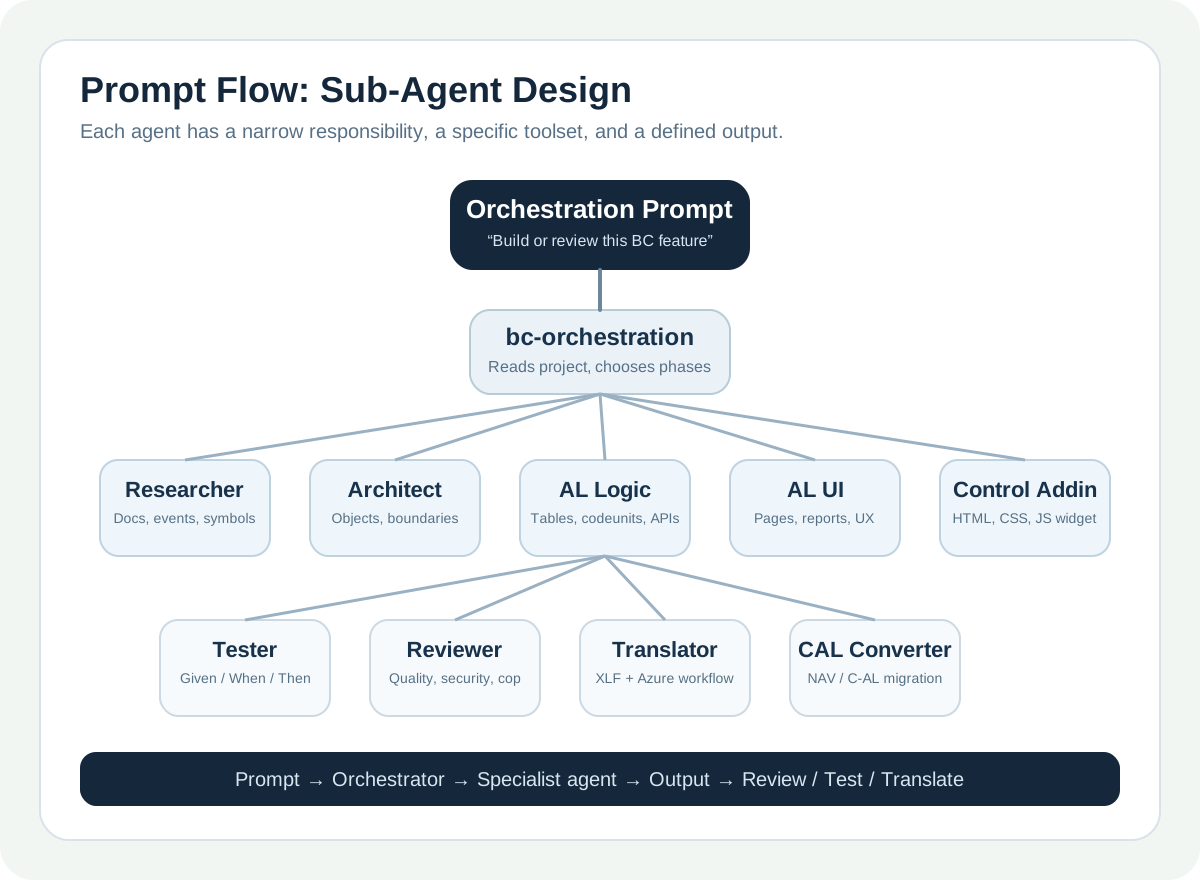
Prompt Flow
The routing flow is:
- Give one clear request.
- The orchestrator decides whether it needs research, design, implementation, testing, review, translation, or migration.
- Each sub-agent gets a narrower prompt and a narrower toolset.
- The results come back in order instead of one overloaded answer.
What They Can Do in VS Code
In VS Code, the extension installs the packaged assets into ~/.copilot/skills/ and ~/.copilot/agents/.
It also updates chat.agentFilesLocations so Copilot can find them.
That means the sub-agents can be used for:
- research
- architecture
- AL logic
- AL UI
- testing
- review
- translation in the current SKC setup
This is all running inside VS Code, with the packaged assets installed into Copilot’s skills and agents folders.
How To Use Them
Use explicit prompts when you want a specific role.
Examples:
Research how this event works in Business CentralDesign the extension objects for this requirementImplement the AL logic for this featureBuild the page for this designReview this AL codeunitTranslate this app to Frenchin the current SKC setup
Or use the orchestration entry point and let it delegate the work to the right agent.
The Pattern
The split is straightforward:
- researcher: find docs, patterns, constraints
- architect: propose the shape and tradeoffs
- implementer: make the change
- reviewer or tester: challenge the result
More specifically, the packaged agents are designed like this:
bc-researcher: readsapp.json, scans the AL codebase, checks Microsoft Learn, and returns findings for architecture.bc-architect: turns research into an object plan, extension strategy, integration design, and upgrade path.bc-al-logic: writes tables, codeunits, enums, integration code, and applies project AL patterns.bc-al-ui: writes pages, reports, page extensions, and applies UX and accessibility rules for BC pages.bc-control-addin: handles HTML/CSS/JS control addins separately so visual components do not get mixed into normal AL UI work.bc-tester: creates Given/When/Then AL tests and focuses on happy paths, edge cases, and error paths.bc-reviewer: checks quality, security, AppSource readiness, analyzer compliance, permissions, and data classification.bc-translator: builds XLF files, creates target language files, runs the SKC Azure-backed translation workflow in the current setup, and verifies coverage.bc-cal-converter: handles NAV or C/AL migration with different paths for extensions vs new AL objects.bc-orchestration: is the top-level router that reads project settings, asks scoping questions when needed, and delegates the phases.
That is also the clearest difference from skills:
- the skill explains the workflow
- the sub-agent owns one lane inside the workflow
That is enough for most real work.
It is also enough for another developer to recreate the setup without copying the whole stack.
Example Handoffs
Short prompts work best when the role is clear:
Researcher:
Find the official docs, existing patterns, and constraints for this feature.

Architect:
Turn that into the smallest safe implementation plan.

Implementer:
Execute the plan without changing unrelated files.

Reviewer:
List bugs, regressions, and weak assumptions.
That is why this still feels like engineering work instead of automation theatre.
Translation Note
The translation workflow exists in the current SKC setup, but it is not yet available to the community at this stage. Right now, the SKC extension uses a private SKC Azure function for AI translation. Over time, some of that flow may be exposed more directly inside the extension itself.
Try It Yourself
Use three roles first:
- researcher
- implementer
- reviewer
Then add more only when the work justifies it.
If you want the packaged public version:
- Install SKC VS Tools.
- Run
SKC: Configure MCP Auth. - Run
SKC: Apply Presets. - Install the bundled skills and agents.
If you want your own independent version, keep the same structure and swap in your own names, prompts, and MCP servers.
That is the practical takeaway for me: use the public setup as an example, not as a dependency.
Loading comments…